Chapter 5
Admin Dashboard & Ops
The dashboard is the ops console for the ecosystem: Discord OAuth, guild-scoped permissions, settings forms backed by shared Zod schemas, ATM queues, audits, health, and reports. Workers, tests, and failure-mode design are covered in the next chapter.
Access model
After Discord OAuth (NextAuth), users pick a guild where they are Administrator or hold the configured manager role. Routes live under /dashboard/g/[guildId]/… with gates for bot presence, role checks, and Discord API rate-limit handling. Settings UIs can be limited so managers who only need users / transactions never see dangerous knobs.
- Guild picker after login - only guilds where access is allowed.
- Manager role is itself a guild setting - configurable without redeploy.
- Discord Administrator vs manager distinction keeps day-to-day ops safer.
General & manage surfaces
General
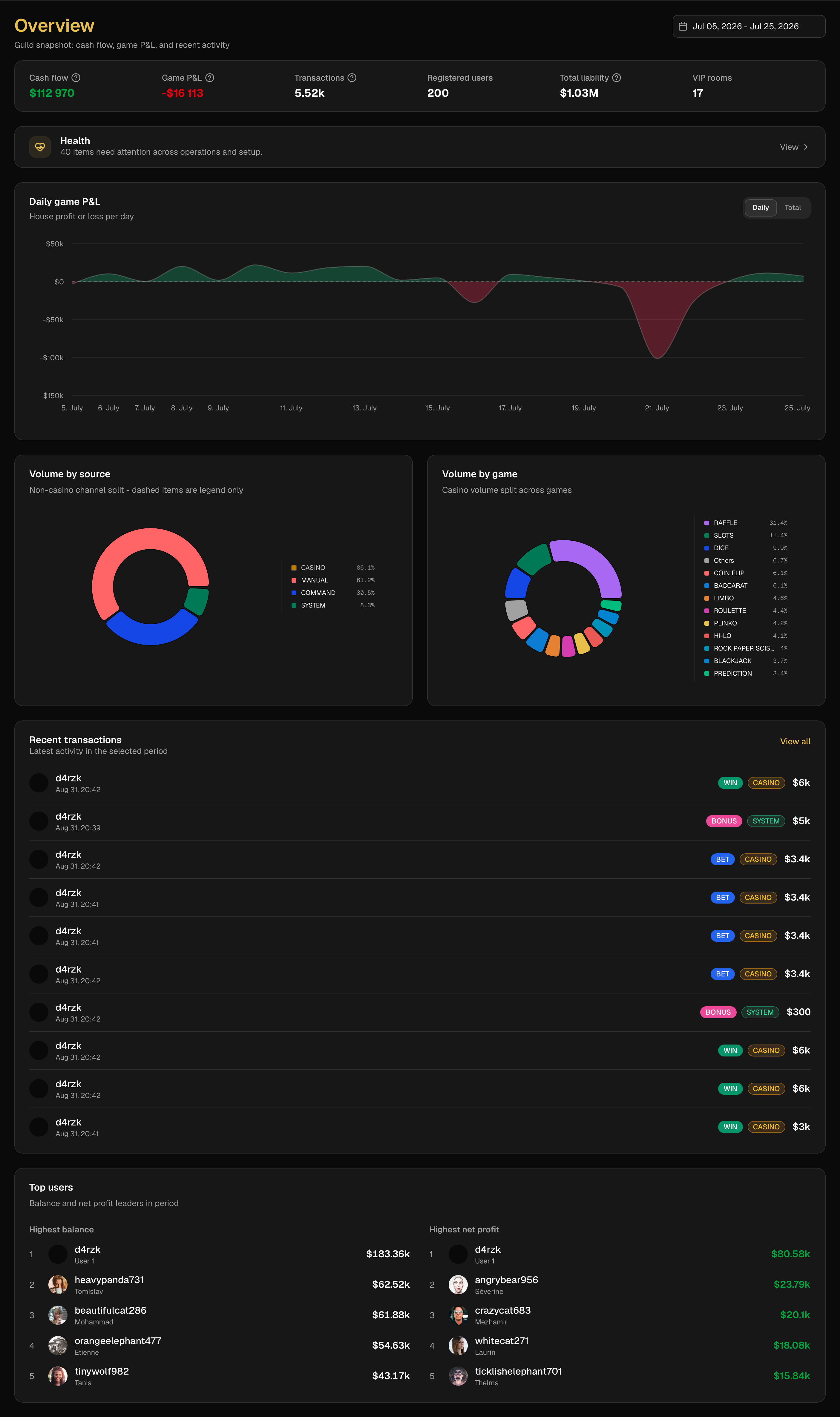
- Overview - guild snapshot and quick health signals.
- System health - runtime / config checks (incl. casino side bets).
- Transactions - filters, search, cash-flow and game PnL panels.
- Reports - exportable ops views.
- Staff actions & settings-change audits - who changed what.
Manage
- Users - register/unregister, deposit, withdraw, bonus, reset.
- ATM approval queue - approve/deny deposit & withdraw requests.
- VIPs - active VIP channels table.
- Predictions, raffles, quests - create/inspect from the web.
- Bans & moderation - ban table and Discord role sync.
Settings (Zod-backed)
Settings forms validate through shared Zod schemas so the dashboard cannot save shapes the bot cannot read. Saves go through server actions into the same GuildConfiguration the bot consumes.
- Channels - ATM, casino, prediction, raffle, worker-log bindings.
- Global / manager role - who can open the dashboard beyond Discord Administrator.
- VIP - pricing, roles, category, multi-member fees.
- Bonuses - streak model + live calendar preview.
- Pay - fee percent, min/max, daily transfer caps.
- Moderation - guild moderation knobs.
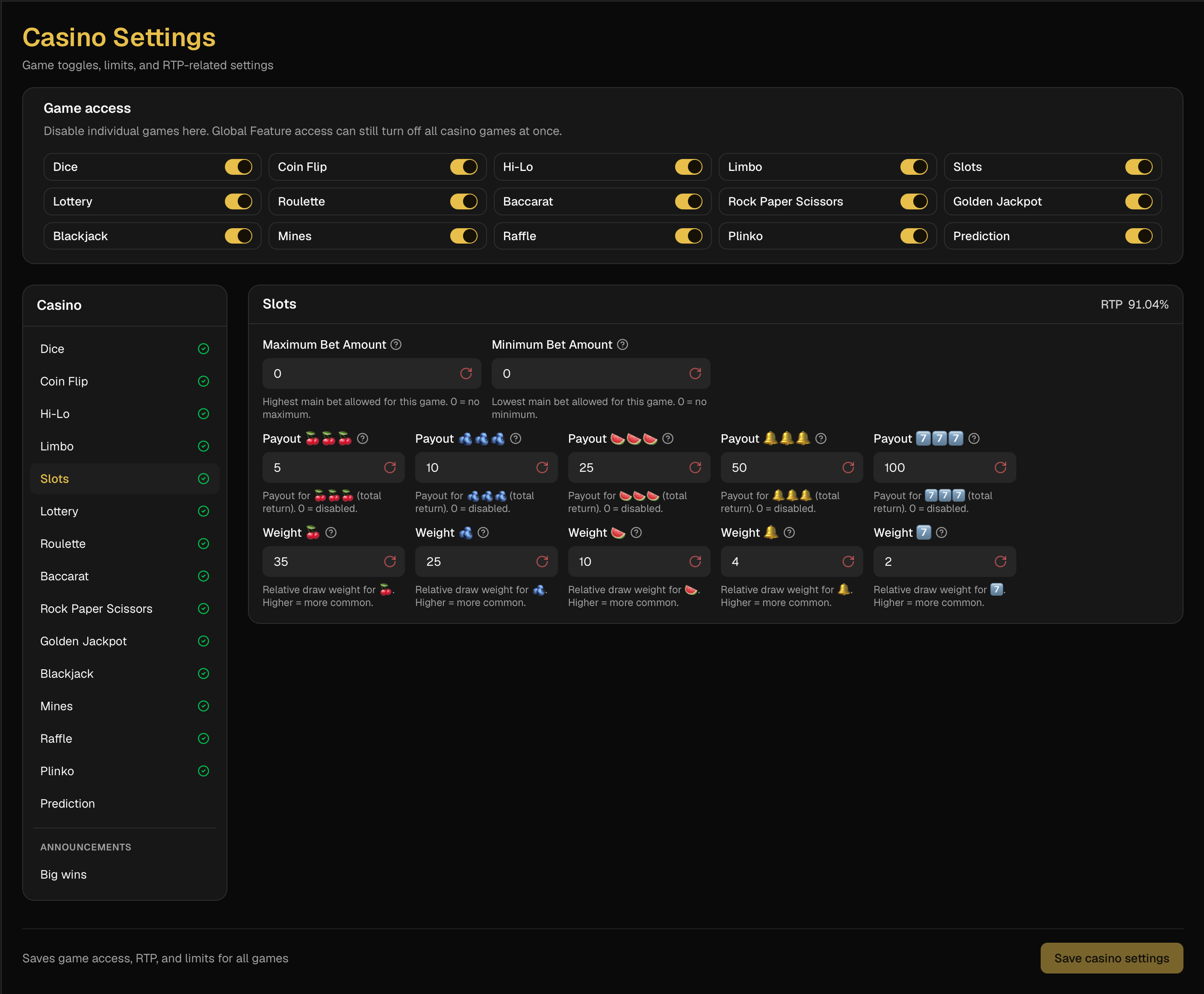
- Casino accordion - every game with enable toggle, bet limits, multipliers, nested side-bet editors, and live RTP headers (warnings when RTP ≤ 90% or ≥ 100%).
Presentation / demo mode
The admin app ships an always-on read-only demo at /present/* in the same deploy - not a second site. A sentinel demo guild and an internal presentation header feed synthetic session + fixture data so reviewers can walk the full UI without Discord OAuth or production guild access.
- Reads come from static fixtures (guild, members, transactions, ATM queue, health, audits) with realistic avatars.
- Writes are blocked with rejectDemoMutation / assertNotDemoMutation so demo never mutates real data.
- Bot-side /mock-db seeds parallel mock users and MockUserProfile docs (usernames + avatar URLs) for local/dev dashboards.
- Next image config allows the avatar host so presentation and mock tables render real portraits instead of broken images.
Public casino overview
Guilds can also expose a read-only /[guildId] casino card view (bets, multipliers, RTP) for transparent house rules without full dashboard access.